Search for products...
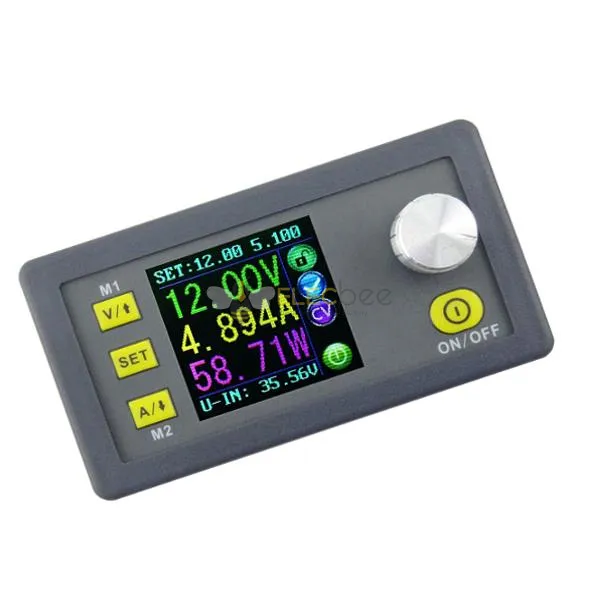
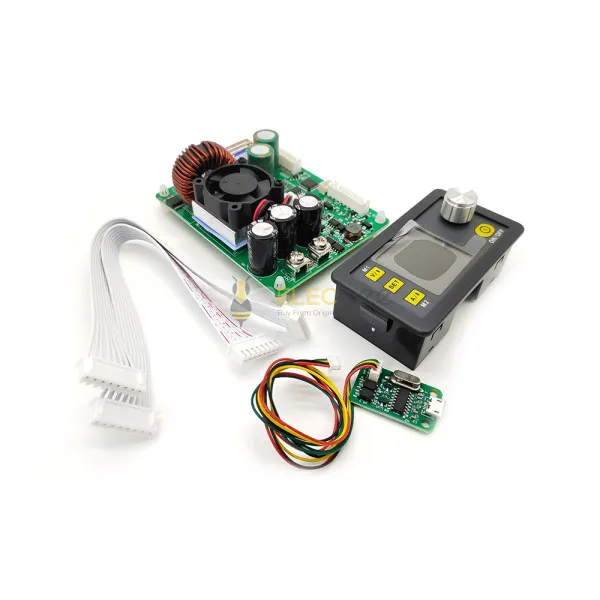
Input voltage range: 6.00-40.00V
Output voltage range: 0V-32.00V
Output current: 0-5.000A
Output power range: 0-160.0W
Product Weight: about 113g
Product Dimension: 79*43*48(mm) (L*W*H)
Open size: 71mm*39mm
Output voltage resolution: 0.01V
Output current resolution: 0.001A
Output Voltage accuracy: ± (0.5% + 1 digits)
Output Current accuracy: ± (0.5% + 2 digit)
NOTE: You must make sure that the input voltage is 1.1 times higher than output voltage. Under large current circumstances, pay attention to heat elimination.
| DPS3005(This item) | DPS5005 (ID: 1062473) | DPS5015 (ID: 1267786) | DPS5020 (ID: 1181200) | DPH5005 (ID: 1230368) | DPS8005 (ID: 1257198) | ||||||
| DP50V5A | DP30V5A | DPS3003 (ID: 1062475) | DPS3012 (ID: 1065235) | DPH3205 (ID: 1105294) | DPS3005 | DPS5005 | DPS5015 | DPS5020 | DPH5005 | DPS8005 | |
| DPS3005-USB | DPS5005-USB | DPS5015-USB | DPS5020-USB | DPH5005-USB | DPS8005-USB | ||||||
| DPS3005-USB-BT | DPS5005-USB-BT | DPS5015-USB-BT | DPS5020-USB-BT | DPH5005-USB-BT | DPS8005-USB-BT | ||||||
| Difference between DP,DPS and DPH | 1. DPS series are updated version. Panel is different. In DPS series, we change the M1/↑and M2/↓ into V/↑and A/↓. You can press those buttons Set the voltage and current fast. We add a new function “set default boot open or close output”Others are not changed. 2. All those power supply can charge the battery directly, don't need external diode. When charging battery, don't connect battery polarity reversely , otherwise, power parts will bunt. Find the difference between DPS and DP see this video https://img.elecbee.com/eb/download/video/ptt931rrXo8.mp4 3. DP power supply and DPS power supply are all buck (step-down) converter. But DPH3205 and DPH5005 is buck-boost (step-down and step-up) converter. 4. DPS3005, DPS5005 DPS5015, DPS5020, DPH5005 and DPS8005 have communication version. You can connect PC and use upper computer. | ||||||||||
| Communication function | NO | NO | NO | NO | NO | Yes | Yes | Yes | YES | YES | YES |
| Working mode | Buck | Buck | Buck | Buck | Buck-Boost | Buck | Buck | Buck | Buck | Buck- Boost | Buck |
| Input voltage | 6-55V | 6-40V | 6-40V | 6-40V | 6-40V | 6-40V | 6-55V | 6-60V | 6-60V | 6-50V | 10-90V |
| Output voltage | 0-50.00V | 0-32V | 0-32V | 0-32V | 0-32V | 0-32V | 0-50V | 0-50V | 0-50V | 0-50V | 0-80V |
| Output current | 0-5.000A | 0-5.000A | 0-3.000A | 0-12.00A | 0-5.000A | 0-5.000A | 0-5.000A | 0-15.00A | 0-20.00A | 0-5.000A | 0-5.000A |
| Output power | 0-250W | 0-160W | 0-96W | 0-384W | 0-160W | 0-160W | 0-250W | 0-750W | 0-999.9W | 0-250W | 0-400W |
| Voltage resolution | 0.01V | 0.01V | 0.01V | 0.01V | 0.01V | 0.01V | 0.01V | 0.01V | 0.01V | 0.01V | 0.01V |
| Current resolution | 0.001A | 0.001A | 0.001A | 0.01A | 0.001A | 0.001A | 0.001A | 0.01A | 0.01A | 0.001A | 0.001A |
| Product size | 79*43*38mm (display part)| 93*71*41(power module) Only DPS5020/DPS5015/DPS3012/DPH5005/DPH3205 has power module | ||||||||||
| Screen | Color LCD | ||||||||||
| Fan | NO | NO | NO | YES | YES | NO | NO | YES | YES | YES | NO |
| Charge the battery | YES | YES | YES | YES | YES | YES | YES | YES | YES | YES | YES |
| Function | ·Preset output voltage / current(in two places by SET KEY) ·Preset protection value ·6 running status icons ·Key lock ·Data setting and store the specified data group ·Store shortcut storage value ·Exact shortcut M1 or M2 or specified data group ·Adjust LCD brightness ·Open or close output ·10 data groups | · Preset output voltage / current(in two places, by V,A button and SET KEY) · Preset protection value · 6 running status icons · Key lock · Data setting and store the specified data group · Store shortcut storage value · Exact shortcut M1 or M2 or specified data group · Adjust LCD brightness · Open or close output · 10 data groups · Set default boot open or close output | |||||||||
File download:
1. DPS3005 operation instruction, PC software, and PC software instuction, android phone APP
A: Main download link: https://img.elecbee.com/eb/download/zip/DPS3005_file.zip
B: Backup download link: https://drive.google.com/open?id=1VywytIUjvWwLPKbkM0VF_jbBFb9QYeyN
2. PC software (only support For Win7 and above) download link: https://img.elecbee.com/eb/download/zip/DPS3005_file.zip, or https://drive.google.com/open?id=1salzBnCkcFdfsSrefUb-8cQiKOmYXZm7
3. APP download link :
Android phone APP (support android 5.0 and above): https://img.elecbee.com/eb/download/zip/DPS3005_file.zip
4. For 3005 USB BT case-C1, that is DPS5020 USB BT and case suitable for DPS5020 USB BT
The installation instruction: (suitable for no power module product): https://drive.google.com/open?id=16SfU1ulXqVTfGpWazRgzPMxUCVauc1Rv
5. Upper computer installation, connection by USB and Bluetooth video: https://img.elecbee.com/eb/download/video/7BL6KmY4x-A.mp4
Android phone APP video show: https://img.elecbee.com/eb/download/video/mX1oO1a1nGs.mp4
Shipping | Delivery Period | For in-stock parts, orders are estimated to ship out in 3 days. Elecbee ships orders once a day at about 5pm except Sunday. Once shipped, estimated delivery time depends on the below carriers you chose. DHL Express: 3-7 business days DHLeCommerce: 12-22 business days FedEx International Priority: 3-7 business days EMS: 10-15 business days Registered Air Mail: 15-30 business days | |
| Shipping Rates | Shipping rates for your order can be found in the shopping cart. | ||
| Shipping Options | Shipping rates for your order can be found in the shopping cart. | ||
| Shipping Tracking | We will notify you by email with tracking number once order is shipped. You can track your order using the “Track My Order” feature. | ||
| Returning/Warranty | Returning | Returns are normally accepted when completed within 30 days from date of shipment, please contact customer service for a return authorization. Parts should be unused and in original packaging. Customer has to take charge for the shipping | |
| Warranty | All Elecbee purchases come with a 30-day money-back return policy, plus 1-year Elecbee warranty against any manufacturing defects. | ||
| This warranty shall not apply to any item where defects have been caused by improper customer assembly failure by customer to follow instructions, product modification, negligent or improper operation | |||
| Ordering | How to Buy | Elecbee accepts online orders. | |
| Add to cart > Check out > Submit order > Complete payment > Delivery | |||
| Payment | PayPal, Credit Card includes Visa, Master, American Express, Bank transfer. | ||